CVE matching
ONEKEY automatically matches vulnerabilities with the components found in your firmware.
Vulnerabilities are collected from multiple databases: NIST NVD (National Vulnerability Database) and OSV (Open Source Vulnerabilities).
NVD uses CPE-based component identifiers. If the platform cannot determine the correct CPE for a component, you can edit the Vendor and Product fields to improve NVD matching results. OSV uses Package URLs (purls) derived from package manager metadata (npm, Maven, etc.) and other sources such as embedded binary provenance information.
If the same vulnerability appears in multiple databases but with a different vulnerability identifier, the platform creates one entry and lists the alternative vulnerability identifiers under Ids.
CVE details
To see the vulnerabilities found in a particular firmware, enter Firmware analysis view and click the CVEs tab.
Info
ONEKEY uses Automated Impact Assessment to automatically determine if a vulnerability is relevant or not for specific firmware, so only applicable vulnerabilities are displayed.
For a list of vulnerabilities found in all uploaded firmware, select the Search in tab in the top menu bar and click CVE.
Click on a vulnerability to learn more about it.
Summary
Short description of the vulnerability and basic information, such as the date it was published, the unofficial name given by the discoverer, CWE, and EPSS information. (1)
-
The CWE (Common Weakness Enumeration) identifies the class of weakness being exploited – for example, a buffer overflow, improper authentication, or use-after-free. Click on the CWE ID to read the full weakness description.
EPSS (Exploit Prediction Scoring System) shows the probability of a vulnerability being exploited. The greater the score the higher the chance for an exploit. The percentile means the proportion of all scored vulnerabilities with the same or a lower EPSS score.1 Click on the question mark to learn more.
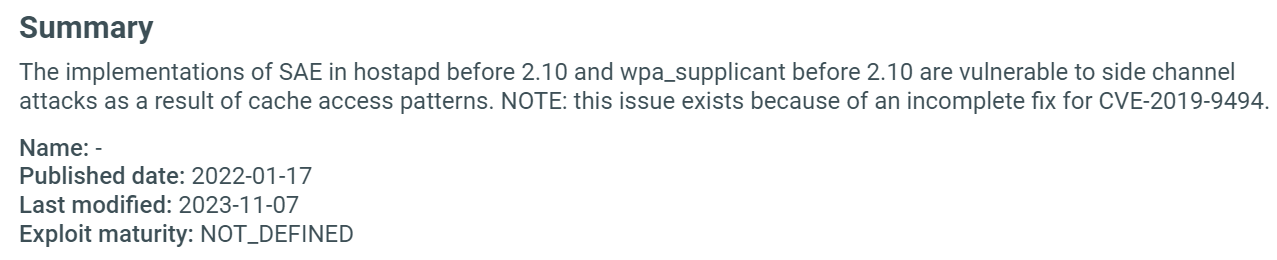
Fields are shown only when data is available for the given vulnerability.
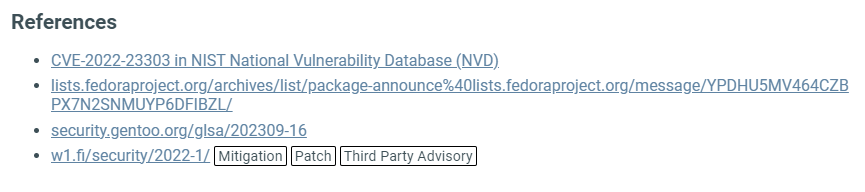
References
List of websites from where the platform got the displayed information, along with some further reading about the vulnerability.
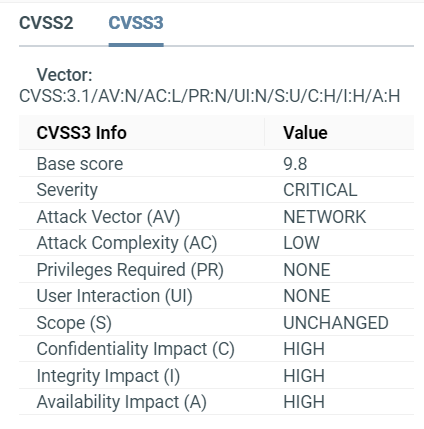
CVSS
CVSS stands for Common Vulnerability Scoring System; it shows the risk factor of a vulnerability by assigning it a score from 0-10 (0 means no risk, 10 means critical risk). CVSS also includes other details like attack complexity, integrity impact etc.
ONEKEY displays CVSS2, CVSS3, and CVSS4 (where available) vulnerability information.
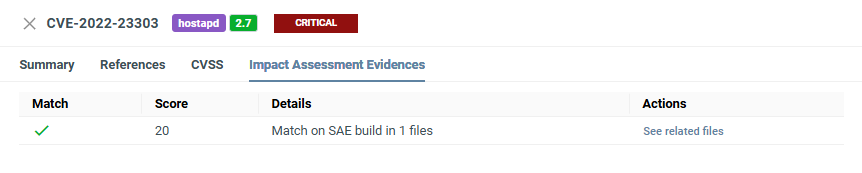
Automated Impact Assessment
Here you can see how the Automated Impact Assessment match score was calculated and the evidence behind the score and decision.
Compare CVEs
You can compare vulnerabilities across two separate firmware images or across multiple analyses of the same firmware – for example, to track how your vulnerability exposure changes between versions.
See Compare analyses to get started.
CVE Matches vs. CVE Entries
A CVE Entry is a vulnerability record in the CVE database – it describes the vulnerability itself. Even if a CVE affects multiple components in the compared firmware, it counts as one entry.
A CVE Match is one occurrence of a specific CVE in a component. If the same CVE affects multiple components, each affected component counts as a separate CVE match.
For example, if CVE-2024-53141 affects two Linux kernel versions in the compared firmware, this counts as 2 CVE matches but only 1 CVE entry.
Calculating severity
Severity is based on the CVSS3 score:
| Severity | Severity Score Range |
|---|---|
| Informational | 0.0 |
| Low | 0.1-3.9 |
| Medium | 4.0-6.9 |
| High | 7.0-8.9 |
| Critical | 9.0-10.0 |
Custom CVEs
User CVE DB entries go through the same matching process as built-in CVEs and appear alongside them in the analysis results. A few details are worth highlighting.
ID fields
Each user CVE entry has three ID fields:
| Field | Required | Description |
|---|---|---|
| IDs | Yes (at least one) | The entry's identifiers. The first one is the primary ID (shown in tables and firmware views); the rest are aliases. An ID can appear in only one entry, whether as primary or alias. |
| Upstreams | No | IDs of vulnerabilities this entry is derived from (for example, a downstream advisory referencing an upstream CVE). |
| Related | No | IDs of loosely related vulnerabilities that are not the same issue. |
Note
Attempting to save an entry with an ID that's already used by another custom CVE (as primary or alias) will be rejected. An error will show the conflicting ID.
Upstreams and Related are informational cross-references and do not affect matching.
Configuration matching
Each CVE entry has one or more configurations. A configuration defines a component and the affected version range.
- PURL configurations use a Package URL identity (
pkg:<type>/<namespace>/<name>–<version>,<qualifiers>, and<subpath>are ignored) and a VERS spec, for examplevers:npm/>=2.7.2|<=3.4.2. Whether<namespace>is required, optional, or prohibited is determined by the<type>(see the Package URL spec). - CPE configurations use a CPE 2.3 vendor and product segment with version ranges built from
>=,>,=,<, and<=bounds.
A CVE applies to a firmware component if any of its configurations match that component. You can freely mix PURL and CPE configurations in a single entry; this is useful when the same vulnerability is identified by PURL in one source and by CPE in another.
Custom vs. built-in CVEs
When both databases have entries with overlapping IDs (primary or alias), user entries take priority. If your User CVE DB produces any match for a CVE, all built-in matches for that CVE (and any of its aliases) are dropped, even for other components.
This is useful when you intentionally override a public CVE for your tenant; your user entry's configuration becomes the only one applied for that CVE, regardless of what the built-in entry covered.
Automated Impact Assessment on user CVEs
Automated Impact Assessment uses two kinds of rules:
- Manually created rules built by ONEKEY security analysts.
- Automatically generated rules derived from a vulnerability's description.
A user entry only gets the manually created rules of a built-in CVE it shares an ID with. Automatically generated rules don't apply, since they don't cross databases.
This means a user CVE that reuses a known CVE ID inherits the existing rules for that CVE. Custom IDs (for example ACME-2024-0001) don't inherit any ID-specific rules, so they're scored against fewer rules. When a public CVE ID applies, reusing it gives the user entry better scoring than a custom ID.
Triage and reporting
User CVE matches appear on the CVEs page like any other vulnerability and support the full triage workflow – statuses, comments, severity override, CVSS Environmental scoring, SSVC, and VEX import. They also appear when comparing analyses and in exports.
User CVE entries carry a USER source tag, which you can filter on in the CVE table.
Bulk operations
The createOrUpdateUserCVEEntries GraphQL mutation accepts a list of entries, so you can add or update entries in bulk with one call. The deleteUserCVEEntries mutation accepts a list of CVE IDs, so you can remove entries in bulk. Together, they let you sync the User CVE DB from a script. See the REST and GraphQL APIs for authentication and usage.